Everything in flight, in one cockpit
Office Cockpit pulls your GitHub pull requests, Jira tickets and the Claude Code sessions working on them into one live view. Start an agent from your iPad, answer it from your phone, and let workflows handle the follow-ups you keep forgetting.No credit card. New accounts join a short queue during early access.
Works with
- GitHub
- GitHub Projects
- Jira Cloud
- Claude Code
- Codex
- macOS
- Linux
- iPad & iPhone
Why a cockpit
Your work is scattered. Your agents are stuck waiting.
A pull request waits on a review in one repo. The ticket it closes sits “In Progress” in Jira. The Claude Code session that wrote it asked you a question forty minutes ago, in a terminal on a Mac you're not sitting at. Each tool knows its own piece. None of them tells you what needs you right now.
Tabs everywhere
GitHub notifications, Jira boards and terminal windows, checked one at a time.
Agents idle in silence
A session that needs an answer just stops until you happen to look.
Follow-ups slip
Re-request a review after a push, summarize a PR before you review it, chase the failing check.
What you get
One place to see it, start it and finish it
See everything in flight
Pull requests, issues, GitHub Projects and Jira tickets from every repository and site you connect, in spaces and views you shape. What changed since you last looked is highlighted.
Drive your agents from anywhere
Start a Claude Code or Codex session on your own Mac straight from an item, follow it from the iPad, and answer its questions from your phone.
Automate the follow-ups
When a field changes, a trigger starts a workflow written in GitHub Actions-style YAML: summarize a PR when your review is requested, or ask an agent to fix failing CI.
Know the moment you’re needed
Push notifications on iPhone, iPad and Mac when a review is requested, a check fails, or an agent is waiting for your answer.
Secure by design
Your Mac never opens a port. Nodes dial out, run only signed jobs from a short list, and keep their own credentials.
Free to start
Pro is free for every account until February 1, 2027. After that, Free stays free and Pro is $3.99 a month.
See it work
Your machines, your workflows
Three short tours of the real app, recorded on demo data: your nodes and what they may run, a workflow that hands a review to an agent, and a view split into panes.
See every machine, what it can run, and approve the work before it starts. 1½ min.
A trigger fires, the workflow summarizes the PR, asks you, and starts an agent. 1 min.
Tile a view like tmux, zoom into one pane, and lay it out in Settings. 1¼ min.
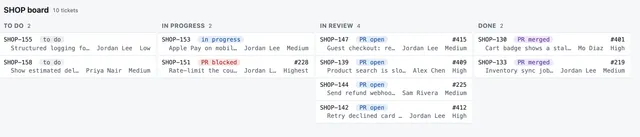
Unified views
A view that knows what matters
Group by repository, status or person
Lists and boards, sorted the way you work.
Pull request and ticket on one row
Each pull request is linked to the Jira issue it closes, with its review state and checks.
Changes stand out
Items that changed since your last visit are highlighted until you open them.
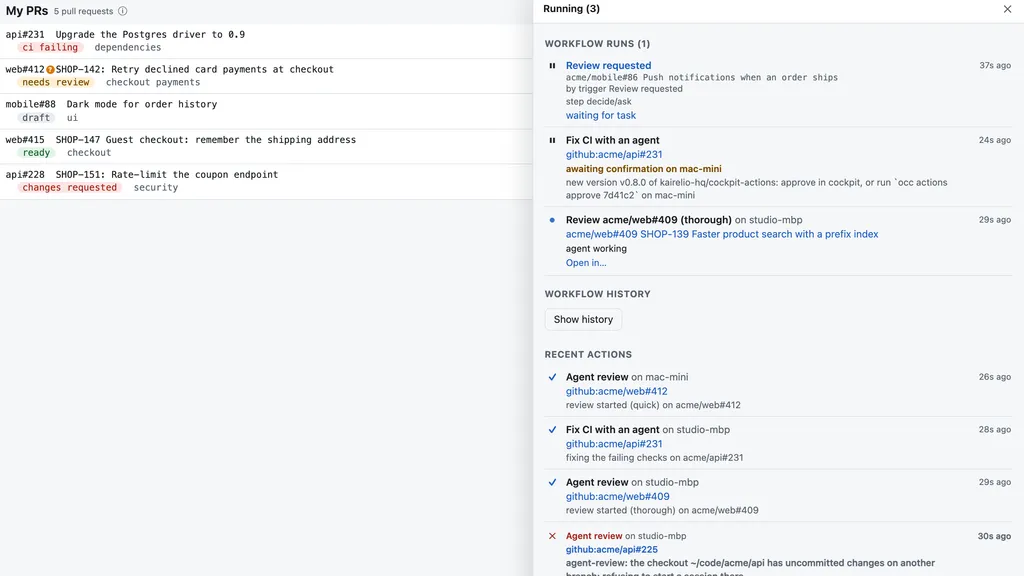
Agent sessions
Your Mac, on a leash you hold from the couch
Start from an item
Pick a pull request or ticket, choose the checkout, go.
Remote Control link
Office Cockpit tells your Mac to open the session and hands you the link to follow it.
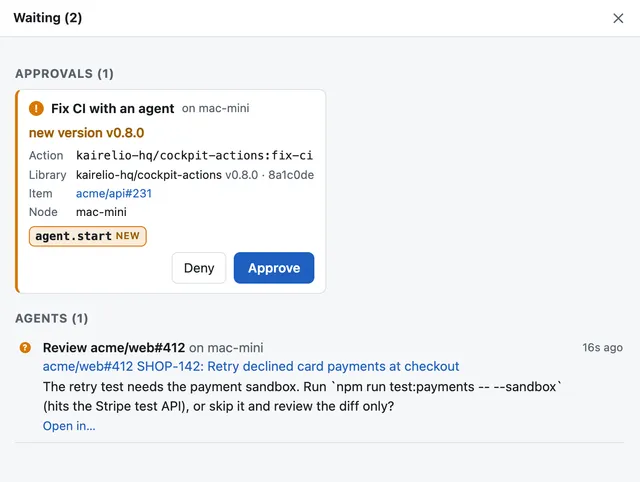
Every machine at once
See each session running, waiting for input or done, across all your nodes.
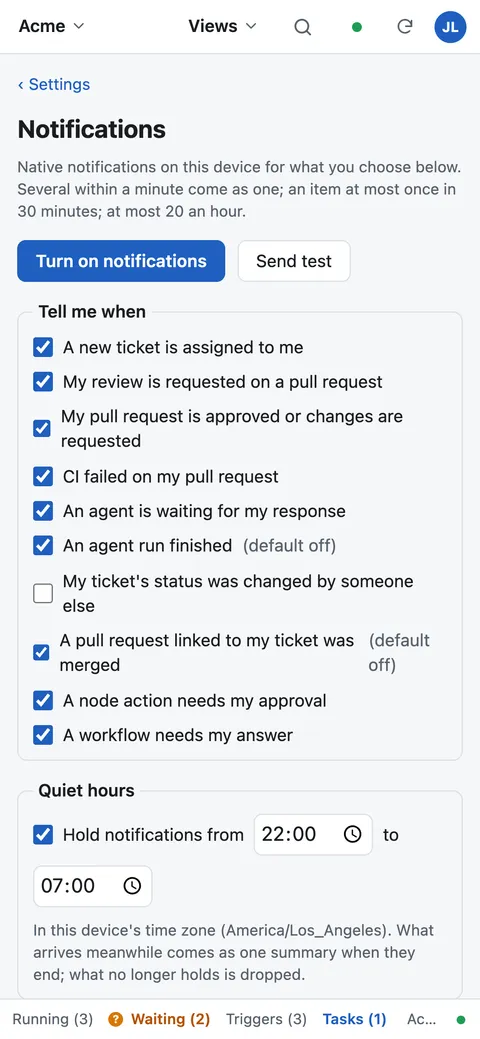
Notifications
Interrupted only when it counts
You choose the events
Reviews, failing checks, waiting agents, approvals and more.
Batched and quiet
One notification a minute at most, and quiet hours in your zone.
Never stale
A notification that is no longer true is dropped: a review you already gave won’t ping you.
Up and running in four steps
Sign in with Google
One click. No password to create.
Connect GitHub and Jira
Add a token, sign in with OAuth, or use the gh login already on your Mac. Pick the repositories, projects and JQL queries to follow.
Register your Mac
Install occ with Homebrew, run occ register, approve it in the browser. It runs as a login service.
Open the cockpit anywhere
In any browser, or add it to your iPad and iPhone home screen as an app.
Security
Your Mac never opens a port
Office Cockpit can start sessions on your machine, so we built it like infrastructure, not like a chat bot.
Nodes dial out
Your machine connects out to the cockpit. Nothing connects in.
Signed, typed jobs
A node runs only job kinds it knows, signed by the cockpit — never an arbitrary command.
Credentials stay put
Encrypted on the server, or held by your Mac and never sent anywhere.
Questions, answered
Is it free?
Yes. During early access every account has Pro at no cost until February 1, 2027, with no credit card. After that your account moves to the Free plan, which stays free, and you can upgrade to Pro for $3.99 a month.
Why is there a queue?
We admit new accounts in batches during early access so that sync and support keep up. Sign in once to take your place; we email you when you’re in.
Do I need a Mac?
Only to run agent sessions. Views, notifications and automation work without a node. The node, occ, runs on macOS and Linux.
Does my code leave my machine?
No. Sessions run on your machine, in your checkouts. The cockpit stores the metadata of your pull requests and tickets — titles, states, people, labels, times — not your source code.
Do I need Claude Code?
For agent sessions, yes, or Codex. Everything else works without either.
Which Jira?
Jira Cloud, connected with an API token or OAuth sign-in.
Can my team use it?
Each person signs in with their own Google account and connects their own credentials. Shared spaces and groups exist today; team billing is on the way.
Stop checking. Start steering.
Sign in with Google and put your pull requests, tickets and agents in one place. Pro is free untilFebruary 1, 2027.